Stewara
Worship planning

Start Sunday with Scripture, not a set list.

Build worship sets around your message. Choose a theme, purpose and length, compare complete sets, then adjust keys on the circle of fifths. Sermon, charts, service timing and volunteer assignments stay together.

Often replaces a standalone services planner, and the group-text + Drive workflow around Sunday.

Start your 30-day trial

No credit card to start · 30-day trial of every module in the suite except Stewara Assistant. · See pricing

Stewara Worship. Drag-and-drop service plans and song library
  1. 1Scripture hub Sermon and passage sit at the top of the plan.
  2. 2Playable keys Suggestions score circle-of-fifths flow.
  3. 3One team page Charts, assignments, and timing stay together.
A Sunday plan with Scripture first, then songs and the team.
What is this?

What Worship is, and what it isn’t.

Stewara Worship is church service-planning software for sermons, worship sets, charts, running times and volunteers. Start with the message, choose a theme, and compare complete sets shaped by purpose, length, song history and key transitions. Review the suggestions and keep control of the final plan. Worship is part of the Stewara suite, alongside member care, giving, check-in and fund accounting.

See it in action

A short, real walkthrough of Worship in Stewara. No sign-up required to watch.

A worked service plan

From the message to a complete worship set

Here is the same fictional Sunday you can try in the demo. The song choices, keys and running times below come from Stewara’s planning engine.

  1. Choose the message and theme

    Ephesians 2:8–10, “Grace that changes how we live.” Choose Grace as the theme, Worship set as the role, and four songs as the length. In this public example, the theme is prepared; the demo does not interpret an arbitrary passage.

  2. Compare complete sets

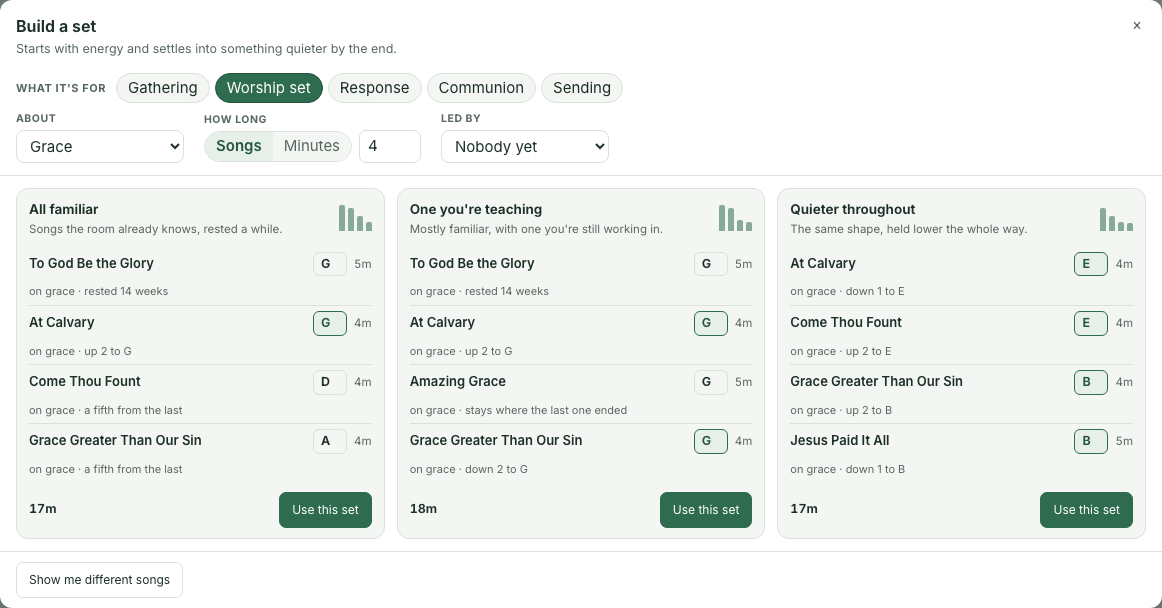
    The builder offers three candidates: all familiar, one song you’re teaching, and a quieter set. It weighs the theme tags in your library, song history, energy and key transitions. A leader reviews the reasons and chooses a set.

Stewara’s set builder showing Grace as the theme, a four-song worship set, and three complete candidates with song keys and selection reasons.
The actual Stewara set builder with fictional church data. Select the image to enlarge it.
One suggested set: 17 minutes
SongKeyLengthWhy it fits
To God Be the GloryG5 minon grace · rested 14 weeks · sits right for this spot
At CalvaryG4 minon grace · up 2 to G · stays where the last one ended · rested 14 weeks · sits right for this spot
Come Thou FountD4 minon grace · a fifth from the last · rested 14 weeks · sits right for this spot
Grace Greater Than Our SinA4 minon grace · a fifth from the last · rested 14 weeks · sits right for this spot
  1. Check the transition before rehearsal

    For this set, the first two songs are in G and G. Change the second song to D: the transition from G to D is a fifth. The circle-of-fifths wheel and flow strip update together. Your band’s and congregation’s comfortable range still matters.

  2. See the timing and assign a leader

    With a 10:00 AM start, a four-minute welcome, this set, a 24-minute sermon and a three-minute benediction, the service ends at 10:48 AM. A 29-minute sermon moves the benediction from 10:45 AM to 10:50 AM and the finish to 10:53 AM. Assign the set leader on the plan.

Compare Stewara with Planning Center

The same sample data is used for everyone. No signup, customer records or messages are involved. The demo’s hymn titles have fictional arrangement metadata; it supplies no licensed lyrics or charts.

Bring your songs. Build your first service.

The sample shows how planning works. In your trial, add songs or import your song list from CSV, review the keys and tags, and add your people before scheduling your team. Your church’s repertoire and preferences make the plan yours.

Song CSV import includes titles, authors, keys, tempo, CCLI numbers and tags. Lyrics, licensed charts, existing service plans and team assignments do not transfer with that list.

Share with your church team →
The message, then everything else

You choose the songs for the message. It makes them playable.

8/23/26Sunday · 10:00 AM · 8 items · 63 min
Nothing Can Separate Us — Romans 8:38-39
63mPLANNED10:00 AM start18m overtarget 45m11:03 AMENDS ABOUT
Flow
A · 120→ sameA · 124→ IVD · 70→ stepE · 68
Upbeat → Driving → Ballad → Ballad

D is the IV of A: the band drops a fourth, then steps up into E. Nothing jumps.

  1. PRE-SERVICE
  2. 10:00 AMCountdown & Welcomeleader5m
  3. WORSHIP SET
  4. 10:05 AMHouse of the LordAJordan5m
  5. 10:10 AMThis Is Amazing GraceAJordan5m
  6. 10:15 AMKing of KingsDJordan5m
  7. 10:20 AMWelcome & Offeringleader4m
  8. MESSAGE
  9. 10:24 AMMessage — Nothing Can Separate Us (Romans 8:38-39)Michael32m
  10. RESPONSE
  11. 10:56 AMWay MakerEJordan5m
  12. 11:01 AMBenedictionleader2m
The third song is yours.

Easy to play. It is about the Cross, not about this Sunday. D is the IV of A: the band drops a fourth, then steps up into E. Nothing jumps.

The whole thingThis is the plan, an hour before anyone arrives.Order of service, running clock, who is leading what. Twelve rows that have to survive contact with a Sunday morning, and one of them decides all the others.
FirstThe message goes in first.Put the title and passage at the top of the plan, then choose the theme the music should support. The team can see the message alongside the songs and service order.
ThenThen the songs go under it.You match them to what you are preaching — Cornerstone is filed under Hope and Faith, which is what Romans 8 is about — and the plan re-times itself around whatever you choose.
AndAnd the keys have to chain.Suggestions consider the relationship between keys: same key, a fourth, a fifth, or relative major/minor. Pick one and compare the transition with the range your musicians and congregation can sing.

Grace Harbor is our demo church, never a testimonial. This is one of its service plans drawn as real type, wired to nothing. The key chain, the tempo arc and the clock under it are computed by the same functions the product ships.

The message, then everything else

You choose the songs for the message. It makes them playable.

8/23/26Sunday · 10:00 AM · 8 items · 63 min
Nothing Can Separate Us — Romans 8:38-39
63mPLANNED10:00 AM start18m overtarget 45m11:03 AMENDS ABOUT
Flow
A · 120→ sameA · 124→ IVD · 70→ stepE · 68
Upbeat → Driving → Ballad → Ballad

D is the IV of A: the band drops a fourth, then steps up into E. Nothing jumps.

  1. PRE-SERVICE
  2. 10:00 AMCountdown & Welcomeleader5m
  3. WORSHIP SET
  4. 10:05 AMHouse of the LordAJordan5m
  5. 10:10 AMThis Is Amazing GraceAJordan5m
  6. 10:15 AMKing of KingsDJordan5m
  7. 10:20 AMWelcome & Offeringleader4m
  8. MESSAGE
  9. 10:24 AMMessage — Nothing Can Separate Us (Romans 8:38-39)Michael32m
  10. RESPONSE
  11. 10:56 AMWay MakerEJordan5m
  12. 11:01 AMBenedictionleader2m
The third song is yours.

Easy to play. It is about the Cross, not about this Sunday. D is the IV of A: the band drops a fourth, then steps up into E. Nothing jumps.

The whole thing

This is the plan, an hour before anyone arrives.

Order of service, running clock, who is leading what. Twelve rows that have to survive contact with a Sunday morning, and one of them decides all the others.

First

The message goes in first.

Put the title and passage at the top of the plan, then choose the theme the music should support. The team can see the message alongside the songs and service order.

Then

Then the songs go under it.

You match them to what you are preaching — Cornerstone is filed under Hope and Faith, which is what Romans 8 is about — and the plan re-times itself around whatever you choose.

And

And the keys have to chain.

Suggestions consider the relationship between keys: same key, a fourth, a fifth, or relative major/minor. Pick one and compare the transition with the range your musicians and congregation can sing.

Grace Harbor is our demo church, never a testimonial. This is one of its service plans drawn as real type, wired to nothing. The key chain, the tempo arc and the clock under it are computed by the same functions the product ships.

Plan Thursday from the passage.

Start your 30-day trial
Capabilities

What it does, grouped by the job.

Start from Scripture

Put sermon title and Scripture on the plan, then choose a theme to match. The set builder uses your library’s theme tags. The trial does not automatically interpret Scripture.

  • Sermon and Scripture on the plan
  • Sets from your chosen theme
  • Start from last Sunday

Shape a playable set

Choose the set’s purpose and length, compare complete candidates, then adjust keys on the circle of fifths. Paste chords, preview the conversion and transpose authorized charts.

  • Complete sets by role, theme and length
  • Circle-of-fifths scoring
  • Sounding key and capo shapes

Hand the team one plan

Custom teams, positions, blockouts, and a read-only mobile schedule. Charts and running-clock order stay on the same page.

  • Assignments by position
  • Mobile My Schedule
  • Running-clock order of service
Also included

Every Worship feature, in one list

  • Sermon title and Scripture as first-class fields on every service plan
  • Complete set candidates from a chosen theme, role, length and song history
  • Song suggestions scored for circle-of-fifths key flow (same, fifth, fourth, relative)
  • Song library sortable by key on the circle of fifths
  • Plain-text chords-over-lyrics import with before/after preview and one-step undo
  • Major + minor transposition, semitone controls, and explicit sounding-key / capo-shape display
  • ChordPro charts with live, transposable web and mobile views
  • Drag-to-reorder order of service with running-clock timing
  • "Start from last Sunday": clone a prior plan in one click
  • Duplicate any service plan
  • Song library: search by title, author, or tag
  • Upload PDF or image charts when you'd rather not re-type
  • "Not played in weeks" nudge keeps the set list fresh
  • Custom teams (Band, Vocals, Tech, Hosts) with a team leader
  • Custom positions per team
  • Volunteer scheduling by position, per service
  • Availability / blockout board: see who's out before you schedule
  • Read-only "My Schedule" for volunteers on mobile
  • Post-service actual-use confirmation kept separate from the original plan
  • Exception queue for unconfirmed songs, changed plans, and missing CCLI numbers
  • Auditable CCLI preparation worksheet: CSV, print, service drill-down, checksum, and recorded-in-CCLI history
For switchers

If you're on Planning Center Services

  • UsuallyServices supports plans, teams, arrangements, song tags and transposition. Check which rehearsal tools and licensed-chart integrations your team relies on before moving.With StewaraTry building a complete set by purpose, theme and length, then inspect its key path and selection reasons. Worship, member care and fund accounting are included in the Stewara suite.

Full suite vs Planning Center · What actually moves

Questions

The objections, answered here.

Does Stewara submit our CCLI report?

No. Worship prepares an auditable actual-use worksheet: CSV, print, service drill-down, checksum, and a record that you later entered it in CCLI. It never calls a download “submitted,” and it does not send data to CCLI.

Do song suggestions pick the set for us?

The set builder proposes complete sets from your library using a chosen theme, purpose, length, song history and key relationships. It explains the candidates; a worship leader chooses which to apply and can adjust the keys. This is planning assistance, not an assessment of a song’s theology or your congregation’s vocal range.

Does the trial choose songs automatically from Scripture?

No. Record the passage and choose the theme yourself; the builder matches songs using your library’s theme tags. Automatic Scripture interpretation is not included in the trial. The public demo uses prepared sermon themes.

Can we try Stewara alongside our current service planner?

Yes. Try the sample church without signing up, then plan a service during the trial alongside your current system. There is no automatic migration or live synchronization of another planner’s service plans. Review people CSV imports, rebuild households, and plan giving-history and licensed-chart handling before switching.

Can musicians see capo shapes?

Yes. The plan can show capo shapes without changing the service’s sounding key, and web and mobile views stay in agreement.

What about last Sunday?

Start from last Sunday clones a prior plan in one click. Duplicate any service when you need a second gathering.

Included in the Stewara plan, and every plan above it.

Plan Thursday from the passage.

Scripture first, keys that transition, one plan for the team. Start your 30-day trial today: every module in the suite except Stewara Assistant, no card required.

See pricing