 Stewara
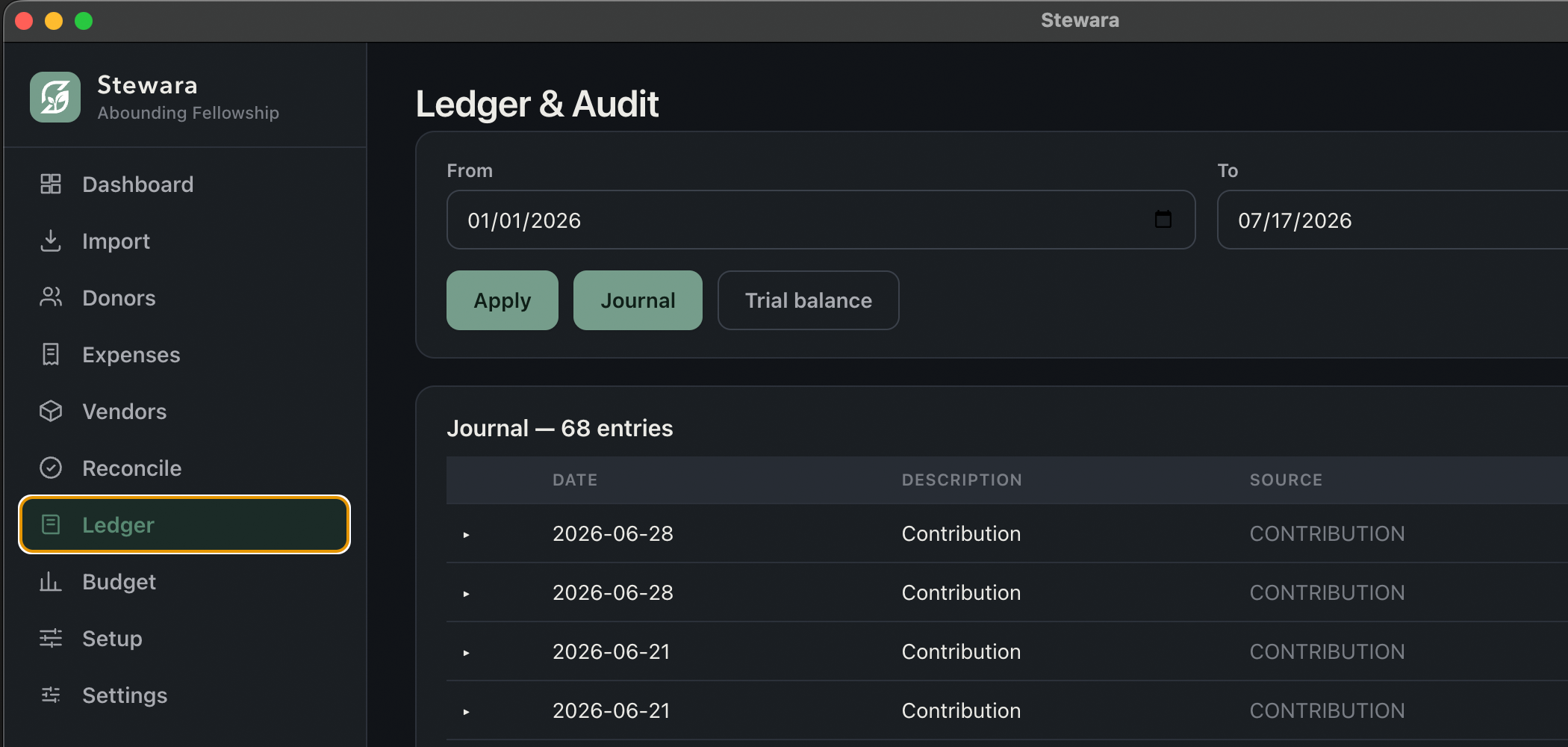

The same ledger, on the desk and across the office. Nobody is emailing a file.
Your treasurer is a volunteer, not an accountant.
Sunday's offering, already in the books.
A true double-entry ledger in the cloud, open to your treasurer and your pastor at the same time. From the office, or from a phone at the count table. Not a second set of books bolted on, and not a CSV export into another system.
She will not be doing debits and credits in her head. Books writes both sides of every entry, labels every button in plain words, and comes with a thirty-minute course for people who have never kept books before. Nothing changes because you looked at it.
$30/mo standalone, or included free inside Stewara ($99/mo). No credit card to start · 30-day trial of every module in the suite except Stewara Assistant. · I only need the books
Watch a full month of church books. Fifteen minutes, no accounting background.
Not a highlight reel. One ordinary month, start to finish: Sunday's offering posted, a bill approved and paid, a volunteer paid back for what she bought, the bank statement matched, and the short end-of-month check. Nothing is sped up and nothing is skipped.
It plays from YouTube. No sign-up to watch, and nothing loads from there until you press play.
- Sunday's giving lands in the booksThe counting team already entered the gifts in Offering. In Books, one button (Post giving to ledger) writes them into the right fund. Already-posted gifts are skipped, so running it twice is safe.
- A bill arrives, and somebody approves itThe electric bill is entered against the vendor, approved, then paid. Approving and paying are two separate dated steps, so the trail always says who said yes and when the money left.
- A volunteer gets paid backShe bought craft supplies for the youth night and photographed the receipt. It arrives in a queue where a treasurer approves or declines it. Nobody is out of pocket, and nobody has to be remembered.
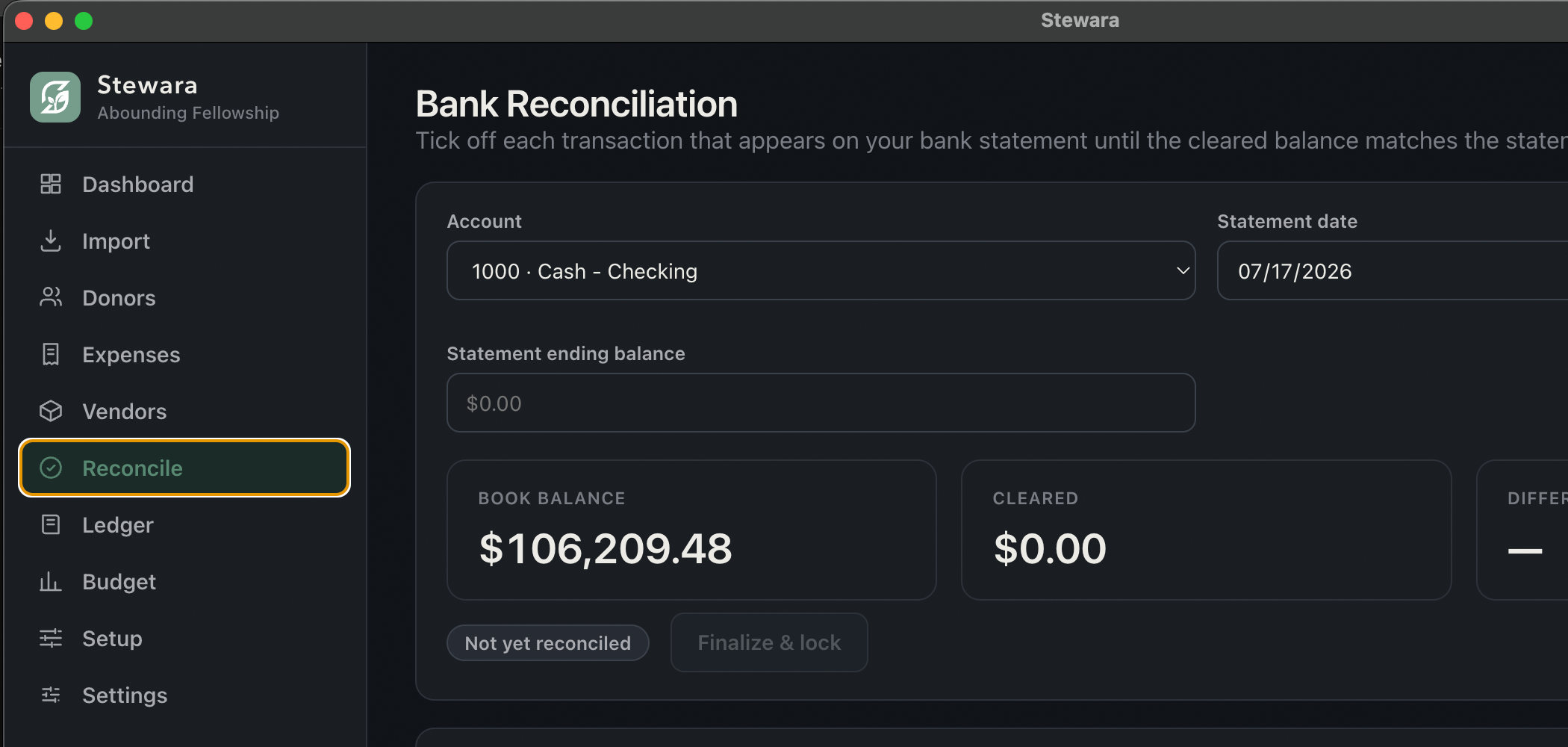
- The bank statement and the books agreeTick each line that shows on the statement. Books keeps the difference running, and turns it into a Balanced chip only when it reaches zero. Finalize will not switch on before that, and it locks the month once it does.
- The month-end check, and then you're doneThe trial balance, a look at the budget lines, and a short summary for whoever the church says should see it. Fifteen quiet minutes, once a month, and the books are current.
“Our treasurer is a volunteer, not an accountant.”
That is the right question to ask, and the honest answer is that she doesn't need to be one. The software does the double-entry; she does the church's actual work: post what came in, pay what is owed, and check that the bank agrees. Every screen is safe to open, and the buttons that change anything say what they will do and ask before they do it.
Built for volunteers
A thirty-minute course is built into Books, written for someone who has never done bookkeeping: seven short lessons, a household word for every term, and a plain rule for when to stop and ask a professional.
Giving flows in automatically
Gifts recorded in Stewara Offering post straight into the ledger through a one-way bridge. No re-typing Sunday's batch into a second system.
Your whole team, in sync
Your treasurer, your pastor and your admin open the same books at the same time, in real time. Role-based access means every person sees exactly what their role should, never more.
- Enter giving from your phone: Treasury runs in a phone browser, right at the count table
- Never lose your books: the ledger lives in the cloud and is backed up, not on one fragile laptop
- Real fund accounting depth, not a checkbook register wearing a church logo
The month closes when the difference reads zero
Type in the statement's date and ending balance, then tick the lines that show on it. The worksheet keeps the difference running for you, and Finalize stays switched off until that difference is zero. Once it's finalized, the month is locked and can't quietly change.
- A live difference, and a Balanced chip at zero
- Finalize locks the month; nothing edits it after
- Typed the balance wrong? Edit statement, while it's open
Know where every fund stands, all year
Set a target per line and watch plan against actual move as entries post. No spreadsheet rebuilt by hand the night before a board meeting. Your fiscal year does not have to start in January for any of it to add up.
- Plan vs. actual on every line, by fund
- A quiet flag when a line is running hot
- Fiscal years that don't start in January
What most churches end up with
- UsuallyGiving lives in the church database; the books live in accounting software. A CSV moves between them.With StewaraThe gift and the ledger are the same product, so Sunday's batch posts itself into the right fund.
- UsuallyOne accounting login on one volunteer's laptop, and everyone else asks that person for a number.With StewaraYour treasurer and your pastor open the same books at once, each seeing only what their role grants.
- UsuallyGeneral-business accounting, fund tracking bolted on by naming conventions, and a volunteer left to translate it.With StewaraReal fund accounting — restricted and unrestricted funds, budget-vs-actual by fund, a trial balance — and a course that teaches it.
Also includedEvery fund-accounting feature, in one list
- True double-entry general ledger
- Configurable chart of accounts, per church
- Multiple funds: restricted & unrestricted tracking
- Journal entries with a running audit trail
- Trial balance, ready anytime
- Budgets & budget-vs-actual reporting, by fund
- Vendors, bills & payments (accounts payable)
- 1099 tracking for vendors
- Bank reconciliation worksheet, month by month
- Receipt capture, attached right on the transaction
- Volunteer reimbursement requests, approved or declined in one queue
- Automatic Offering → Treasury giving bridge: no CSV re-key
- A 30-minute course built in, for people new to bookkeeping
Bank-grade infrastructure, honestly explained
Churches trust us with sensitive financial data. Here's exactly how we protect it, built on Google Cloud infrastructure. This describes our security practices, not a compliance certification.
Each church isolated
Every church's books are walled off from every other church's, enforced at the data layer, not just the screen you're looking at.
Encrypted in transit & at rest
Financial data is encrypted moving to and from Stewara, and encrypted in storage.
Role-based access
Your admin and your treasurer post to the books; your pastor can read them. Nobody else on staff holds a key to the ledger at all.
A full audit trail
Every journal entry and edit is logged. Nothing disappears silently.
There is a desktop edition with a paid Treasury plan
Some churches would rather the ledger lived on one church-owned computer and nowhere else. After you choose a paid plan, the same Treasury plan includes a desktop edition that does exactly that: the same double-entry books, no cloud copy. The desktop download and activation are not included in the trial.
Hand your volunteer treasurer books she can actually keep
Start the 30-day trial today (no card required), set up one fund, post one Sunday, and see for yourself. The course is waiting inside, and the walkthrough above is free to watch first.